SR System
What is Soft Reserve (SR)? BIS
BIS
Soft Reserve (SR) is a loot system where players pre-select certain items they want before a raid. If a soft-reserved item dropped only those players who have reserved it are eligible to roll for it, making loot distribution fairer and reducing competition and disputes over BIS gear.
BISSR List
How to reserve an item.
Once your character is part of a team navigate to "SR Item" and click whatever item will benefit you the most, each item may have a different SR cost so be ware on what to reserve, as points are limited by your Guild Master.
1
Navigate to "SR Item"
2
Select the item you want to reserve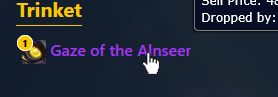
3
Confirm your selection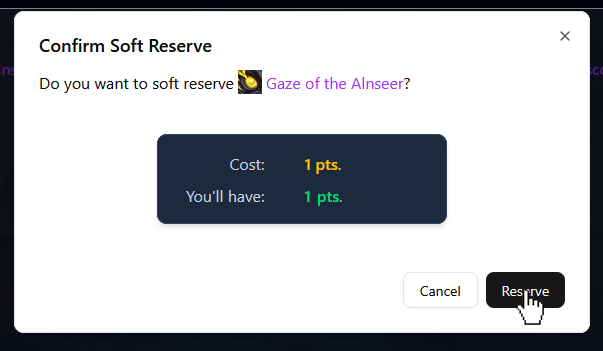
How points are earned and used.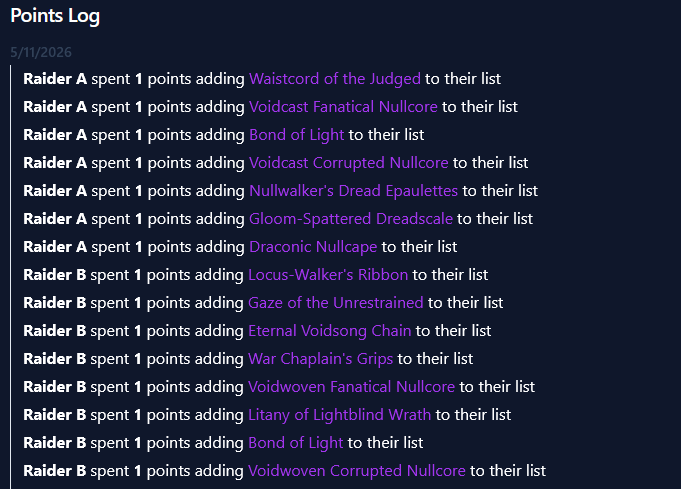
Points are the currency you use to reserve items. The way you earn points its defined by your raid leader, it could be by participating in raids, helping your team, or through rewards set by themselves. The number of points each player receives and how they're awarded will vary by team.
When you reserve an item using the SR system, points are deducted from your character based on the item's SR cost. Some items may cost more than others, so choose your reserves wisely to maximize your potential upgrades.
- Earn points: Join and participate in raids, complete objectives, or receive weekly bonuses from the team leader.
- Spend points: Reserve an item through the SR system; points are instantly subtracted from your available balance.
- Track points: Your current point balance is visible in the SR Item section and everyone's movements can be traced in the Point Log section.
Example of point log section with SR movements.
Rules for item distribution.
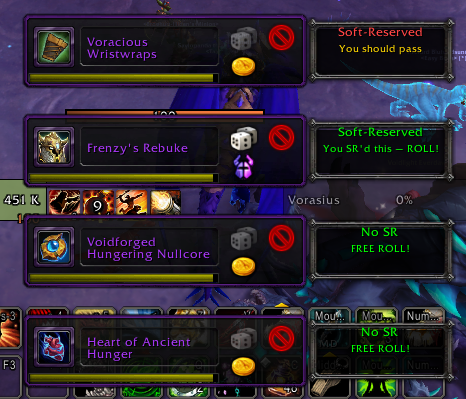
Since this project was made with retail in mind, where Master Loot is no longer available, it relies a lot on the honesty of each player, the raid leader will have access to the full list of soft-reserved items and who reserved what. There are 3 scenarios for each item once loot is available:
- Items has no soft-reserves.
- Item was soft-reserved by yourself (and other raiders).
- Item was soft-reserved by other raider than yourself.
The Companion AddOn communicates with the Helper AddOn* and will display information according to one of these cases for each item.
* More info regarding AddOns bellow.
How to change your reserves.
You can manage your reserved items from the SR Item section. You may only change your reserve while your Raid Leader allows for changes. Any point refunded or spent will update automatically.
- To change your reserve: Unreserve by selecting the reserved item and confirming the switch.
- Changing your reserve may be prevented shortly before or during a raid, based on your team settings.
How the system is reflected and shown in-game.
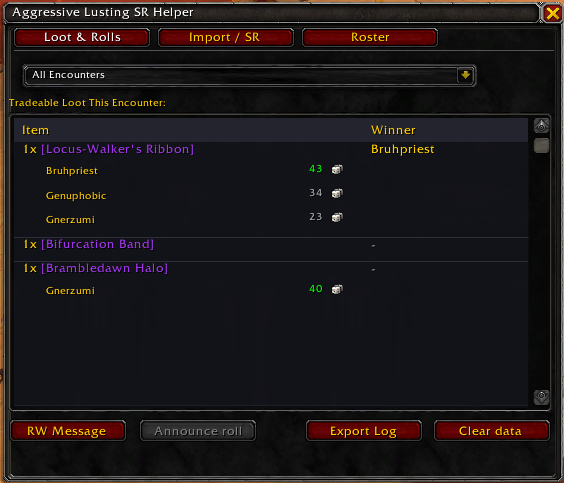
There exists two AddOns available to help manage the SR system in-game: the Helper AddOn and the Companion AddOn. These AddOns provide real-time visibility into everyone's reserves and streamline the loot distribution process during raids, giving transparency during loot distribution. When an item drops:
- Leaders can view who reserved the dropped items.
- Only eligible reservers should roll; this is visible to everyone via the Companion AddOn.
- The SR status can be checked at any time on the SR Items view, including who holds which reserves.
Discord integration.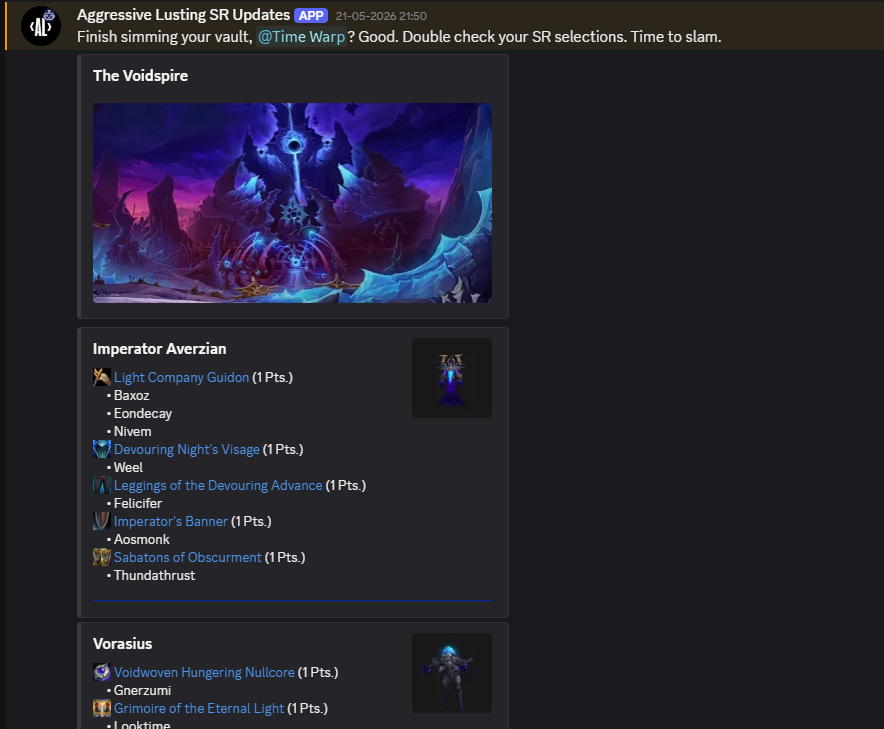
The Discord integration helps streamline communication for your raid team. Once connected, the integration automatically reminds your raiders when raid time is approaching and proactively notifies everyone with a customizable message that the SR window will be locked soon, and it will display the raid and a detailed view of each encounter with each item reserved by each player. This ensures all players have a fair chance to reserve their desired items before raid time.
Example of Discord notifications for upcoming raid and SR locking.
Frequently Asked Questions (FAQ)
Q: Can I reserve more than one item?
A: This depends on your team's rules and how many points you have available. The platform is designed to allow multiple reserves if you have enough points.
A: This depends on your team's rules and how many points you have available. The platform is designed to allow multiple reserves if you have enough points.
Q: What if I lose points and can't afford an item anymore?
A: You cannot reserve an item if you do not have enough points. Your reserve will be denied until you earn or are assigned more points.
A: You cannot reserve an item if you do not have enough points. Your reserve will be denied until you earn or are assigned more points.
Q: Who can see my reserves?
A: Leaders and other team members can view everyone's reserves to ensure transparency.
A: Leaders and other team members can view everyone's reserves to ensure transparency.
Q: What happens if two people tie their rolls?
A: Rolls are handled using the game's default "Need" roll interface, so if two players roll the same number, the game's default system will determine who wins.
A: Rolls are handled using the game's default "Need" roll interface, so if two players roll the same number, the game's default system will determine who wins.
Q: Can I refund my points?
A: Points are generally spent permanently once a reserve is confirmed and the reserving window time is closed.
A: Points are generally spent permanently once a reserve is confirmed and the reserving window time is closed.
Contents